
 ChatGPT
  Perplexity
  Gemini
  Claude AI
 Anthropic has shipped a lot of building blocks in a short time: Skills (Oct 2025), Agent Teams (early 2026), MCP servers, the Agent SDK, and subagents in Claude Code. Each one has its own announcement and docs page, but what's missing is a unified map of how they relate to each other, when one replaces another, and when you need all of them at once.
This guide is that map.
The Mental Model: Five Layers of the Claude Stack
Think of building with Claude as a five-layer system, each layer composed on top of the one below:
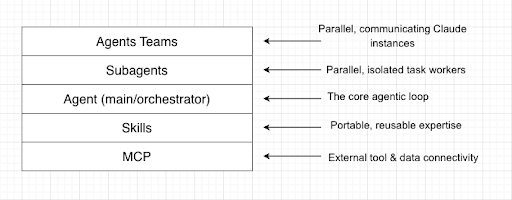
Each layer answers a different question:
| LAYER | Question it answers |
| MCP | What external systems can Claude talk to? |
| Skills | How does Claude know how to do specific things well? |
| Agent | Who is doing the work? |
| Subagents | Can different parts of the work run independently in parallel? |
| Agent Teams | Do those parallel workers need to talk to each other? |
Layer 1 MCP: The Connectivity Layer
What it is
The Model Context Protocol (MCP) is an open standard for connecting Claude to external systems, databases, APIs, SaaS tools, filesystems, and anything else that lives outside the model's context window. Think of it as USB-C for AI: one protocol, many devices.
MCP works through a client/server model. You configure an MCP server that exposes one or more tools (e.g., query a database, fetch a GitHub PR, write to Slack). Claude, acting as the client, issues standardized tool calls to that server and gets structured results back.
// .mcp.json -- configure which servers your agent can use

{

  "mcpServers": {
    "filesystem": {
      "command": "npx",
      "args": ["-y", "@modelcontextprotocol/server-filesystem", "/path/to/project"]
    },
    "github": {

      "command": "npx",
      "args": ["-y", "@modelcontextprotocol/server-github"]
    }
  }
}
When to use it
Use MCP when Claude needs to reach outside itself, like reading a live database, calling an API, interacting with a file system, or triggering an action in an external system. MCP is about connectivity, not knowledge.
Good MCP use cases:
- Fetching real-time data (stock prices, CI/CD status, database records)
- Writing back to external systems (creating Jira tickets, posting to Slack)
- Giving Claude persistent access to files or repositories
- Integrating with SaaS tools (GitHub, Notion, Postgres, etc.)
What MCP is NOT
MCP doesn't teach Claude how to do something. It extends what Claude can reach. If you want Claude to follow your team's code review process or format Excel files a specific way, that's a Skill, not an MCP server.
Layer 2 Skills: The Expertise Layer
What it is
Skills are organized folders of instructions, scripts, and resources that Claude discovers and loads dynamically when they're relevant to a task. Introduced by Anthropic in October 2025, Skills are the mechanism for packaging repeatable expertise into reusable, portable modules.
A minimal skill looks like this:
my-skill/
├── SKILL.md        ← Main instructions (always required)
├── helper.py       ← Optional executable code
└── examples/       ← Optional reference examples
The SKILL.md is the core. It describes what the skill does (surfaced to Claude always) and includes detailed instructions that Claude loads on demand. This progressive disclosure keeps context efficient.
SKILL.md Example: Code Review Skill
---
name: code-review
description: Performs thorough code reviews following our team's security,error-handling, and naming standards. Use automatically when the user asks to review, audit, or assess code quality.
---

## Instructions
1. Check for security vulnerabilities first...
2. Verify error handling covers all edge cases...
3. Flag any violations of our naming conventions...
4. Output a structured review with severity levels: BLOCKER, WARN, INFO
The --- block at the top is the frontmatter, a small YAML header containing the skill's name and description. This is the only part Claude reads on every single request. It's injected into the system prompt automatically, so Claude always knows the skill exists and when to invoke it. Keep it concise: a few sentences at most. Every word here costs tokens on every turn.
Everything below the frontmatter is the full ## Instructions body, code snippets, examples. The body part is only loaded when Claude decides the skill is relevant. This is progressive disclosure in action: Claude matches the user's intent against the description, and if it's a fit, loads the full skill body into context on demand. If the skill isn't needed, those instructions never consume any tokens.
Why this matters for token budgeting:
Every conversation, always in context:
  → Skill frontmatter (name + description) × number of installed skills
Only when the skill is triggered:
  → Full SKILL.md body
  → Any referenced scripts or examples
If you have 10 skills installed, you're paying for 10 frontmatter blocks on every turn, but only the triggered skill's full body. This is why writing tight, precise descriptions pays dividends: vague descriptions bloat your always-on token cost and also risk Claude loading the wrong skill. Treat the description field like a function signature; it should unambiguously describe what the skill does and when to use it.
When to use it
Use a Skill when you find yourself repeating the same instructions across multiple conversations, agents, or projects. If you've copy-pasted a prompt block more than twice, it's time to make it a Skill.
Good Skill use cases:
- Teaching Claude your team's coding standards, test patterns, or architecture conventions
- Packaging complex, multi-step workflows (e.g., "how we do data analysis")
- Giving Claude domain-specific expertise that transfers across projects
- Ensuring consistent output formats (API docs, test reports, PR descriptions)
Skills vs. System Prompts vs. Projects
| Skills | System Prompts | Projects | |
| Scope | Portable across agents, projects, and interfaces | Single conversation/deployment | Specific body of work |
| Triggered by | Claude matches the task to the skill description | Always active | Always active within the project |
| Best for | Reusable how-to expertise | Role/personality config | Persistent context (codebase, docs) |
| Maintained in | A folder | Inline in API call | Project settings |
Rule of thumb: Projects give Claude context about what. Skills give Claude expertise on how. If you'd put it in a CLAUDE.md once, a Skill is the right home for it when it needs to be reused.
Layer 3 The Agent: The Core Execution Layer
What it is
An agent in the Claude context is the fundamental execution unit: a Claude instance running in an agentic loop with access to tools, instructions, and (optionally) Skills and MCP servers. Every other layer above this one is just coordination between agents.
In Claude Code, agents are defined declaratively as Markdown files with YAML frontmatter, stored in .claude/agents/. No Python required. Here's a complete agent definition:
.claude/
└── agents/
    └── architecture-reviewer.md
---
name: architecture-reviewer
description: Reviews codebase architecture for structure, separation of concerns,
and scalability. Use when asked to audit, review, or assess system design.
tools: Read, Grep, Glob
model: claude-opus-4-6
---
You are a senior software architect. When reviewing a codebase:
1. Map the high-level structure -- identify layers, modules, and their responsibilities
2. Check for separation of concerns violations (e.g., business logic leaking into controllers)
3. Flag circular dependencies or tight coupling between modules
4. Assess scalability risks in the current design
5. Output a structured report: CRITICAL, WARN, and SUGGEST severity levels
The frontmatter is the agent's identity card:
| Field | Purpose |
name
|
How Claude and other agents refer to this agent |
description
|
When Claude should delegate to this agent (like a skill's trigger) |
tools
|
Restricted tool set, this agent can only read, Grep, and Glob; it cannot write or run commands |
model
|
Which Claude model powers this agent, useful for routing cost-sensitive tasks to Haiku |
Once defined, Claude Code automatically delegates to this agent when the task matches its description. You can also invoke it explicitly: "Use the architecture-reviewer to audit /src".
Scope: Agent files can live at two levels:
.claude/agents/— project-scoped, only available in this repo~/.claude/agents/— user-scoped, available across all your projects
This loop describes the agent, restricts its tools, let Claude delegate. And this is the agent's heartbeat in Claude Code.
The Claude Agent SDK
For production deployments, Anthropic's Agent SDK provides the scaffolding for:
- Full decision loops with tool use
- Subagent spawning
- Skill loading
- MCP server integration
It's the recommended path for building anything beyond a quick script.
Wait! Isn't this the same format as a subagent?
Yes, and this is the single most common point of confusion in the whole stack. The file format for an agent and a subagent is identical; both are Markdown files with YAML frontmatter in .claude/agents/. There is no syntactic difference between them.
The distinction is entirely behavioural; it's about the role the instance plays at runtime, not how the file is written:
| Agent (Orchestrator) | Subagent (Worker) | |
| File format | .claude/agents/my-agent.md
|
.claude/agents/my-agent.md
|
| Frontmatter | Identical (name, description, tools, model)
|
Identical |
| Who invokes it | You (the human) or an external trigger | The parent agent/orchestrator |
| Role | Coordinates the overall task, decides what to delegate | Executes one discrete task, reports back |
| Context | Holds the full task picture | Isolated — only knows its specific assignment |
| Spawns others? | Yes, can spawn subagents | No — subagents cannot spawn further subagents |
Think of it this way: the same architecture-reviewer.md file could be your top-level agent when you invoke it directly ("Use architecture-reviewer to audit the whole repo"), or it could be a subagent when an orchestrator spawns it as one step in a larger pipeline. The file doesn't decide, the call site does.
This is intentional. It keeps the system composable: you can promote a subagent to an orchestrator or demote an orchestrator to a worker without touching its definition file.
Layer 4 Subagents: The Parallelism Layer
What it is
Subagents are child Claude instances that a parent agent spawns to handle discrete tasks in parallel. Each subagent runs in its own isolated context window, and it doesn't share the parent's conversation history. It receives a specific task, does its work, and reports back.
In Claude Code, you trigger subagents explicitly:
"I need to refactor this codebase. Spawn a subagent to:
Audit all API endpoints for security vulnerabilities
While you continue working on the new authentication flow."
Programmatically via the Agent SDK:
# The SDK handles spawning; conceptually, you're defining task isolation:

subagent_task = {
    "instructions": "Review all Python files in /src/auth/ for security issues",
    "tools": ["read_file", "list_directory"],  # restricted tool set
    "context": "Focus only on authentication and authorization patterns"

}
When to use subagents
Use subagents when you have independent, parallelizable tasks that don't need to coordinate with each other mid-execution.
Good subagent use cases:
- Research agent + implementation agent running simultaneously
- Auditing multiple components of a codebase in parallel
- Running verification checks (security scan, lint, tests) concurrently
- Any "fan out and collect" pattern
Don't use subagents for:
- Tasks where worker 2 needs results from worker 1 before starting (use sequential execution instead)
- Edits to the same file (race conditions and merge conflicts)
- Work with many shared dependencies
Token cost note: Each subagent has its own context window. Spawning 4 subagents roughly quadruples your token usage. Only parallelize when the time savings justify the cost.
Layer 5 Agent Teams: The Collaboration Layer
What it is
Agent Teams (currently experimental in Claude Code) take subagents further: instead of workers that only report back to the lead, teammates in an agent team can communicate directly with each other. One session acts as the team lead, but teammates share a task list, send messages to each other, and coordinate without the lead needing to broker every interaction.
Enable in Claude Code:
# In settings.json or environment

CLAUDE_CODE_EXPERIMENTAL_AGENT_TEAMS=1
Subagents vs. Agent Teams
This is the most nuanced distinction in the whole stack:
| Subagents | Agent Teams | |
| Communication | Only report back to the parent | Can message each other directly |
| Coordination | Lead orchestrates everything | Teammates self-coordinate |
| Token cost | High | Significantly higher |
| Best for | Independent parallel tasks | Tasks needing cross-domain synthesis |
| Available in | Claude Code + Agent SDK | Claude Code (experimental) |
Use subagents when workers are independent, for example, backend audit, frontend audit, and test coverage check can all run without knowing what the others find.
Use agent teams when workers need to challenge, review, or build on each other's outputs, for example, one teammate writes the API spec, another reviews it and flags inconsistencies, and a third writes the tests to match. They need to talk.
Architecture analogy: Subagents are like MapReduce workers; they map independently, and results are reduced at the end. Agent teams are like a Scrum sprint; members communicate, hand off work, and resolve blockers with each other.
How They Compose: Real-World Patterns
Pattern 1: The Solo Specialist
"I want Claude to follow our team's PR review process."
Skill only: Write a code-review skill with your team's standards. No agents, no MCP needed.
Pattern 2: The API-Connected Assistant
"I want Claude to query our database and generate reports."
Agent + MCP. The agent runs the loop; MCP servers expose your database and filesystem.
Pattern 3: The Parallel Researcher
"I want Claude to simultaneously research authentication patterns AND write the boilerplate."
Agent + Subagents. The lead agent spawns two subagents, and they work concurrently, and the lead agent synthesizes.
Pattern 4: The Cross-Layer Feature Build
"Build a new payment integration: spec it, implement it, review it, write the tests."
Agent Teams + Skills + MCP. The lead spawns teammates for each phase. Each teammate loads the relevant skill (api-design, code-review, test-writing). MCP servers give them access to the codebase and CI.
Lead Agent
  ├── skills: project-conventions
  ├── MCP: filesystem, github
  │
  ├── Teammate: API Designer
  │   └── skills: api-design, openapi-spec
  │
  ├── Teammate: Implementer
  │   └── skills: payment-patterns, error-handling
  │
  └── Teammate: Reviewer + Test Writer
      └── skills: code-review, test-writing
Decision Tree: Which Tool Do I Need?
Do I need Claude to access an external system (DB, API, file)?
  └─ YES → Add an MCP server
  └─ NO  → Continue

Do I have a workflow I'm re-explaining in every prompt?
  └─ YES → Create a Skill
  └─ NO  → Continue
Do I need Claude to take autonomous, multi-step action?
  └─ YES → Build an Agent (use Agent SDK for production)
  └─ NO  → Standard Claude API call is fine

Does the work break into independent parallel tasks?
  └─ YES → Use Subagents
  └─ NO  → Single agent is sufficient

Do those parallel workers need to share findings mid-task?
  └─ YES → Use Agent Teams (experimental)
  └─ NO  → Subagents are sufficient and cheaper
Common Mistakes to Avoid
1. Using MCP when you want a Skill, MCP connects Claude to external systems. If you're just trying to get Claude to do something the same way every time, that's a Skill. MCP doesn't encode procedure; it exposes tooling.
2. Spawning subagents for sequential tasks. If task B depends on task A's output, parallelizing it yields no gain. Keep it sequential.
3. Creating a subagent for every subtask. Subagents have overhead, spinning up context, token cost, and result synthesis. For small, fast tasks, the overhead exceeds the benefit. Use subagents for tasks that take a meaningful time.
4. Putting all your domain knowledge in system prompts instead of Skills System prompts are ephemeral and lives with a single deployment. If the same expertise needs to travel across Claude Code, the API, claude.ai, and multiple agents, it's a Skill.
5. Jumping to Agent Teams before validating with subagents. Agent Teams are powerful but experimental, token-expensive, and carry known limitations around session resumption and task coordination. Start with subagents. Upgrade to teams only when inter-agent communication is genuinely required.
Summary Cheat Sheet
| Layer | What it does | Where it lives | When to use |
| MCP | Connects Claude to external tools & data | .mcp.json
|
Claude needs to read/write external systems |
| Skills | Packages reusable expertise & workflows | skills/ folder
|
Same workflow needed across multiple agents/conversations |
| Agent | Core execution loop with tool use | API / Agent SDK | Any multi-step autonomous task |
| Subagents | Parallel, isolated task workers | Claude Code / Agent SDK | Independent parallel work |
| Agent Teams | Communicating parallel workers | Claude Code (experimental) | Workers need to coordinate mid-task |
Further Reading
- Official Skills docs — Anthropic's breakdown of Skills vs. Projects, MCP, and subagents
- Agent Teams docs — Claude Code agent teams guide
- MCP specification — Full protocol reference
- DeepLearning.AI: Agent Skills with Anthropic — Hands-on course covering all five layers
- Anthropic Engineering: Equipping agents with Skills — Design rationale behind Skills