
 ChatGPT
  Perplexity
  Gemini
  Claude AI
 A data engineer's guide to the two-way sync story behind Lakebase and why your OLTP-to-lakehouse pipeline might be living on borrowed time.
The Pipeline Nobody Wants to Maintain
Every data platform team eventually builds the same thing: an operational database on one side, a lakehouse on the other, and a pipeline in the middle stitching them together. The tools differ, for example, DMS, Debezium, Fivetran, Airbyte, ADF, and Datastream. But the problem is identical. Data written to your transactional system takes 15 minutes, sometimes an hour, to appear in your analytical layer. And someone, somewhere on your team, is responsible for keeping that pipeline alive.
Because at some point, it will break. The CDC job falls behind on a high-write table. The connector drops a batch. The schema changes, and nobody updated the pipeline. The tools are different for every team, but the 2 am wake-up call feels the same, and so does the question from the business the next morning: "Why is this number 45 minutes old?"
Step back and look at what you are actually running: a CDC tool, a staging layer in object storage, an ingestion pipeline, a transformation job. Sometimes managed, sometimes homegrown. But always multiple services, always real engineering hours, just to move data between two platforms you already own.
Databricks Lakebase is a direct answer to that problem.
What Is Lakebase?
Lakebase is a fully managed PostgreSQL database that lives natively inside Databricks. It runs Postgres 16 and 17, supports pgvector and PostGIS, and works with every tool in the Postgres ecosystem — psycopg2, SQLAlchemy, dbt, you name it.
It was built on Neon, a serverless Postgres company that Databricks acquired in May 2025. The key architectural idea Neon brought is compute/storage separation, storage lives in cloud object storage, and compute spins up independently. This is what makes Lakebase behave differently from a standard managed Postgres.
A few capabilities worth calling out before we get into the sync story:
- Instant copy-on-write branching — branch an 8 TB database in milliseconds. No data is copied. Each branch gets an isolated compute. Git-style workflows for your database.
- Scale-to-zero — compute suspends after inactivity and spins back up on demand. You pay nothing when idle.
- 30-day point-in-time recovery at millisecond precision — restore to any moment in the last 30 days.
- Built-in pgvector — vector similarity search without a separate infrastructure layer. Relevant if you are building RAG pipelines on top of operational data.
- Low latency, high throughput — designed for application workloads, not just analytical queries.
These are show-stoppers on their own. But they are not why this blog exists. The point is what Lakebase does to the pipeline between your operational database and your lakehouse.
Prerequisites
Before diving in, a quick primer on the core concepts this post assumes familiarity with:
- Databricks — a unified data and AI platform for data engineering, analytics, and machine learning.
- Lakehouse Architecture — an architecture that combines the low-cost storage of a data lake with the reliability and performance of a data warehouse.
- Delta Table — an open-source storage format that brings ACID transactions, schema enforcement, and versioning to data lake tables.
- Unity Catalog — Databricks' unified governance layer for data and AI assets, providing centralized access control, lineage, and discovery.
The Two-Way Sync: The Real Story
Lakebase introduces a native, bidirectional data bridge between your operational database and your lakehouse. It works in both directions and eliminates something your team is probably building and maintaining manually today.
Direction 1: Lakebase → Lakehouse (Lakehouse Sync)
This is the one that kills the CDC pipeline.
Lakehouse Sync captures row-level changes from Lakebase Postgres tables and writes them directly into Unity Catalog-managed Delta tables with full SCD Type 2 history preserved automatically. Every insert, update, and delete is tracked. No custom merge logic. No APPLY CHANGES INTO boilerplate. No replication instance to babysit.
How it works: Under the hood, Lakehouse Sync runs a continuous CDC stream, not a scheduled batch. As rows change in Lakebase, those changes are captured and streamed into Delta tables in near-real time. SCD Type 2 means every version of every row is preserved with effective timestamps, so your analytical layer always has the full change history, not just the latest snapshot.
The freshness improvement alone is significant, from 15 minutes to hours of lag down to near-real-time. But the operational improvement is arguably bigger. Five moving parts become one. No replication slots to monitor. No object storage landing zone to manage. No ingestion stream to keep healthy.
Set it up: Lakehouse Sync — Official Documentation.
Direction 2: Lakehouse → Lakebase (Synced Tables)
This direction runs in the opposite direction and solves a different problem that most teams are hacking around.
Synced Tables use Lakeflow Spark Declarative Pipelines to continuously push data from your lakehouse into Lakebase Postgres. Sources can be Delta tables, Iceberg tables, views, or materialized views. The result: your analytics-grade lakehouse data becomes available to applications at low latency.
How it works: Lakeflow monitors your source Delta or Iceberg table for changes and incrementally syncs them into the target Lakebase Postgres table. It is continuous, not a cron job, so your Postgres table stays in step with the lakehouse as data lands. The sync is managed entirely by Databricks; you define the source and target, and Lakeflow handles the rest.
The use cases this unlocks:
- Customer-facing dashboards — instead of hitting your SQL Warehouse on every page load (slow, expensive), sync your KPI tables into Lakebase and serve directly from Postgres.
- Enriched user profiles — user data computed and enriched in Spark, synced into Lakebase, served to your app layer at request time.
- Reverse ETL without the tool — data computed in your lakehouse flows into Postgres without needing a separate reverse ETL service.
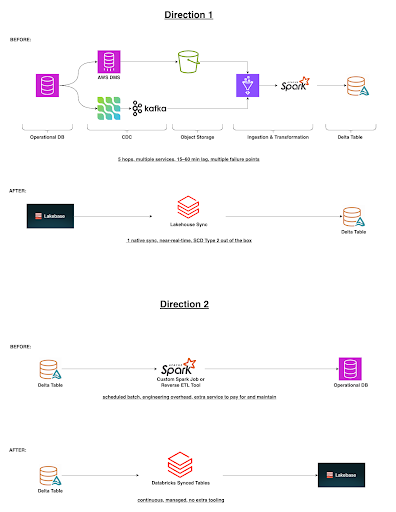
A concrete example: Say you're running an e-commerce platform. Your app writes to an orders table in Lakebase whenever a customer places or updates an order. With Lakehouse Sync, every change, a new order, a status update, a shipping address correction, is captured and written to your orders Delta table in Unity Catalog within seconds, with full SCD Type 2 history: both the old and new row tagged with _change_type and _commit_timestamp, no merge job required. Your Spark pipeline then reads that Delta table and computes a customer_360 purchase history, lifetime value, churn score, product preferences, and, with Synced Tables, that enriched output is continuously mirrored back into Lakebase. Your web app queries it directly and serves a fully enriched customer profile with low latency on every page load, no warehouse cold start, no custom export job, no stale data. One end-to-end loop: app writes orders to Lakebase → Lakehouse Sync streams it into the lakehouse → Spark enriches it → Synced Tables pushes it back to Lakebase for serving.
Today, most teams solving this problem are running a custom Spark job to write to an operational database or paying for a reverse ETL tool. Synced Tables makes it a native, managed pipeline.
Set it up: Synced Tables — Official Documentation.
The Governance Payoff
Both directions flow through Unity Catalog. This is the part that doesn't get enough attention.
In the old architecture, your operational database and your analytical platform have completely separate governance models. Different credential systems. Different access controls. And crucially, no shared lineage. If a compliance auditor asks, "Where did this Delta table's data come from?", you cannot answer that question from within Databricks. You have to go back to your CDC tool logs, cross-reference object storage paths, and hope someone documented the pipeline.
With Lakebase, both the operational database and the analytical layer live inside the same UC hierarchy. You get:
- End-to-end lineage — from the Postgres write all the way through to your Gold Delta table, every hop is tracked and visible in Unity Catalog in one place. No more stitching together lineage from two separate systems. When an auditor or analyst asks where a number came from, you have a single, complete answer.
- Unified access control — column-level security, row filters, and audit logs apply to both your Lakebase Postgres tables and your Delta tables through the same UC policies. Grant access once, and it applies consistently across OLTP and OLAP. Revoke access once, it's gone from both.
- Single data catalog — Lakebase databases are registered as first-class UC catalogs, discoverable alongside your Delta tables, Iceberg tables, and external sources. Your data engineers, analysts, and governance teams all work from the same catalog — no separate database inventory to maintain.
Tying it back to the example: In Direction 1, a row change occurs in the orders table in Lakebase. Lakehouse Sync writes that a change to a Delta table in Unity Catalog. In Unity Catalog's lineage graph, you can trace that Delta table row back to the exact Postgres write timestamp, source table, and change type. If a column in that Delta table is masked for PII, the same masking policy applies to the Lakebase table it came from. One policy, both systems, zero gaps.
Before vs. After
Here is the full picture side by side — the old pattern versus what Lakebase replaces it with.
| Dimension | Operational DB + Lakehouse (old) | Databricks Lakebase (new) |
| OLTP → Lakehouse sync | CDC Tool + Object Storage + Ingestion Pipeline + Transformation Job | Lakehouse Sync (built-in, SCD Type 2) |
| Lakehouse → App sync | Custom Spark job or reverse ETL tool | Synced Tables via Lakeflow |
| Data freshness | 15 min – hours | Near-real-time |
| Governance | Separate credentials per system | Unified Unity Catalog |
| Cross-system lineage | None | End-to-end in Unity Catalog |
| Access control | Managed separately per system | Single UC policy across OLTP + OLAP |
| Billing | Operational DB + CDC tool + Object Storage + Lakehouse (separate) | Single platform (DBUs + DSUs) |
| Operational overhead | 5+ moving parts to monitor and maintain | 1 native sync to manage |
The pattern is the same regardless of your cloud or tooling — the old way requires you to own and operate the bridge. Lakebase removes the bridge entirely.
What to Watch Out For
Lakebase is genuinely compelling, but no GA release is without rough edges. Before you commit to migrating your pipeline, here is what you need to know.
Cloud availability: GA on AWS as of February 2026. Azure is in Public Preview. GCP support is expected later in 2026. If your primary cloud is Azure or GCP, you are not on the mature path yet — factor that into your timeline.
Migration friction: If you have an existing Lakebase Provisioned instance and want to move to Autoscaling (the current default since March 2026), there is no in-place upgrade. You need pg_dump and pg_restore. Not a dealbreaker, but worth knowing before you spin up a large Provisioned instance today.
Terraform IaC gap: The Terraform provider does not yet fully support Lakebase Autoscaling for Synced Tables. There is an open GitHub issue. Teams with strict IaC requirements will hit this and should plan for manual configuration in the interim.
Compliance: At GA, Lakebase Autoscaling supports HIPAA, C5, and TISAX compliance profiles. FedRAMP and PCI-DSS are not supported yet. If your workload sits under either of those frameworks, hold off for now.
Raw OLTP throughput: If your workload sustains 100,000+ TPS with large in-memory buffer pool requirements, a traditional high-memory managed Postgres will still have the edge. Lakebase Autoscaling runs 2 GB RAM per compute unit — tight for heavy OLTP buffer workloads. Lakebase is not trying to win that benchmark, and it does not need to. Its value is in the sync story, not the TPS race.
The Bottom Line
The Neon acquisition was not about building a better-managed Postgres. It was about eliminating the pipeline layer between operational and analytical data, the multi-step stack that every data engineer has built, debugged, and lost sleep over, regardless of their cloud or tooling.
What Databricks is betting on is that the age of bridging two separate platforms is ending. That the right answer is not a better CDC tool or a smarter ingestion framework — it is a single platform where the operational database and the analytical layer are the same governed environment, with data flowing natively between them in both directions.
If your team owns both an operational database and a Databricks platform, and you are currently maintaining a pipeline to keep them in sync, Lakebase is worth evaluating seriously.
The pipeline you have been maintaining is not a feature. It is a workaround. And workarounds tend to get replaced.
References
- Databricks Lakebase is now Generally Available
- A New Era of Databases: Lakebase
- Lakebase Documentation — AWS
- Benchmarking Lakebase vs AWS Aurora using pgbench
Want the full picture? The features covered here are just one part of what Lakebase offers. For branching workflows, autoscaling configuration, pgvector setup, compliance details, and pricing, the official documentation is the most complete reference: Lakebase on Databricks Docs.