

 ChatGPT
  Perplexity
  Gemini
  Claude AI
 Serverless setups can scale easily, adapt quickly, while cutting down server costs. Yet they bring fresh issues like sudden delays, slow initial triggers, blocked executions, or spotty replies now and then.
These problems usually pop up outside standard studies or staged test settings.
Users don’t say:“Your AWS Lambda cold start is 726ms longer than expected.”
They simply say:“The app feels slow sometimes.”
We’ll explore how UI/UX research adapts in a serverless environment, and walk through a practical case study showing how design interventions solved backend-driven pain points without touching a single server.
UX Friction Points in Serverless Architectures:
Here, I’ve listed the topics that exclusively occur in serverless products
Cold Start Delays:
Documented by AWS & Google Cloud: Functions incur 100ms–1s+ startup lag after inactivity, causing a noticeable “app feels slow at first click.”
Sources:
Understanding the Lambda execution environment lifecycle
Understanding and Remediating Cold Starts: An AWS Lambda
Cold Start Problem in Serverless Computing - Thesis by Minh Nguyen
Inconsistent Latency Under Load:
Observed in Netflix & Slack infra: Auto-scaling introduces fluctuating response times during burst traffic, degrading perceived smoothness.
Sources:
FaaSched: A Jitter-Aware Serverless Scheduler
Performance Testing in a Serverless World: Challenges and Strategies
Environment-Dependent Bottlenecks:
BBC iPlayer & Coinbase reported: Performance varies by region, time of day, and workload, making problems appear only in real-world use, not in lab tests.
Sources:
BBC Expands Low Latency Video Streaming Trial on iPlayer Service
Temporal Failure Patterns:
Azure Functions case studies reveal that timeouts and throttles emerge only under specific workflows (e.g., chained microtasks), which can confuse users with intermittent breakage.
Sources:
Getting a Grip on Serverless: Essential Strategies for Serverless Monitoring
Serverless Monitoring Made Simple: Challenges and Solutions with Atatus
AI Model Spin-Up Delays:
Cloudflare Workers AI & AWS Bedrock confirmed: Loading large models introduces unpredictable wait times on the first inference.
Sources:
Serving deep learning models in a serverless platform
Telemetry Visibility Gaps:
Industry reports (Honeycomb, Datadog, New Relic): Traditional APM doesn’t capture per-user latency or cold-start traces, hiding UX-critical delays.
Sources:
Serverless Monitoring Made Simple: Challenges and Solutions with Atatus
Auto-Scaling Transition Lag:
AWS Lambda / Azure consumption plans show: Scale-up/down events temporarily degrade responsiveness even when the backend is “healthy.”
Source link:
Archipelago: A Scalable Low-Latency Serverless Platform
Client Network Variability:
Google UX Research shows that user-device and network quality significantly impact perceived performance, but serverless systems often mask this variance as “backend slowness.
Source link:
Part 19: Deploying Serverless Applications | by Adekola Olawale | Medium
Reactive Rather Than Predictive Optimisation:
Datadog + AWS reports: Serverless infra optimises after slowness is detected, not before, meaning UX suffers before the system self-heals.
Source link:
Performance Testing in a Serverless World: Challenges and Strategies - SDET Tech
Traditional UX Research Fails in Serverless Systems
Typical user research focuses on:
- Interviews
- Usability testing
- Surveys
- Clickstream and heatmaps
These methods are great for navigation, information architecture, or content clarity
But they miss the invisible backend moments, such as:
- Random 2–4 second delay when a cloud function “wakes up”
- Latency when traffic spikes unexpectedly
- Slow first load on seldom-used features
- Cached vs non-cached behaviour
- Region-based delays for global users
In serverless architecture, you can’t rely on backend stability to produce consistent UX behaviour. Instead, you need to research the experience of latency and unpredictability.
How UX Designers Solve These Issues
Here’s how a UI/UX designer becomes the bridge between invisible serverless behaviour and visible user satisfaction.
Before going into details, I would like to mention the approaches we can use to cover all these issues.
- Different types of UI loaders
- Directive UX writings
- UI Interactions
- Self-healing features that ensure user progress & freedom
1. Solve Cold Starts with Perception Design
Cold starts create momentary delays. UX can convert that dead time into a guided experience.
Effective UX approaches we can take:
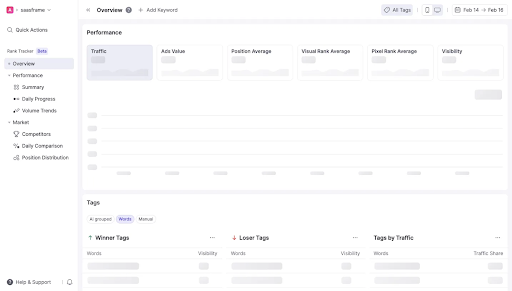
Warm-Up Interactions Light micro-interactions, hover effects, and button animations prepare users mentally for slight delays.
Skeleton Screens Instead of Spinners Skeletons show progress instantly and mask serverless cold start inconsistency. In my experience, this would be a great solution for it.
2. Neutralize Inconsistent Latency with Adaptive Feedback
Latency spikes are unpredictable, but UX feedback doesn’t have to be.
Effective UX approaches we can take:
- Dynamic Waiting States Show animations that adapt in tone depending on wait duration.
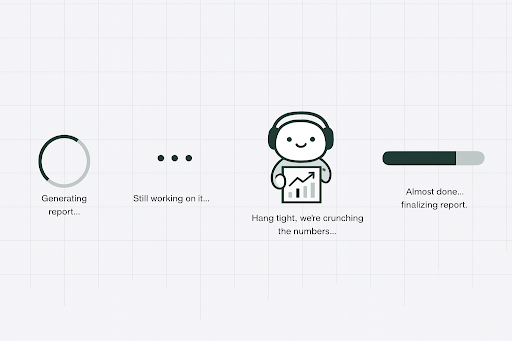
Micro-copy that reduces anxiety Instead of “Loading…”, use:
“Preparing your data...”Optimistic UI Show the expected end-state immediately while the serverless function processes in the background.
3. Prevent Invisible Bottlenecks Using UX-Driven Telemetry
If backend can’t detect slowness, UX research can.
How designers contribute:
- Capture client-side timestamps to measure actual user experience.
- Create a UX latency dashboard that logs:
- Interaction type
- Expected vs. real latency
- Device, network, and location
Now UX has real data to challenge bottlenecks that traditional testing misses.
4. Solve Context-Dependent Failures with Flow-Aware Design
Serverless failures are flow-specific.
UX can map them by:
Conducting path analysis (where users were before the failure).
Tracking specific interaction stacks (e.g., upload → validate → preview).
Designing self-healing flows, such as:
- auto-retries
- one-tap resume states
- saving progress locally so users don’t lose data
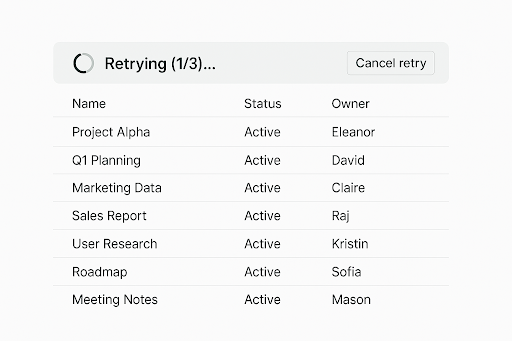
How it helps: Users visually understand:
- The system is trying again
- Their progress isn’t lost
- They can resume anytime
5. Patch Telemetry Blind Spots with In-Product Experience Monitors
Users' pain should never reach social media before it reaches the product team.
UX solutions:
- Add inline sentiment capture (“Was this slow?”)
- Add live performance meters hidden from users but visible in analytics
- Use real-time trace logs combined with user journey maps
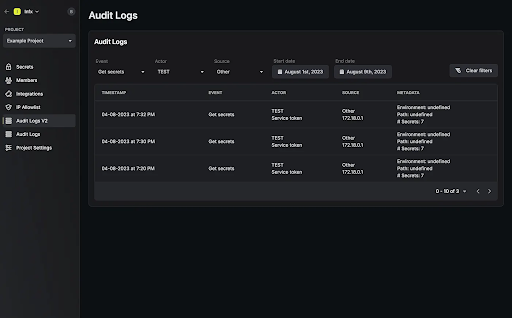
This gives designers actual visibility into how serverless behaves at the UX level.
6. Reduce Device-Dependent Delays with Responsive Experiences
Serverless doesn’t control devices,UX does.
Strategies:
- Automatically degrade heavy UI elements on slower networks.
- Let users choose “Data Saver Mode.”
- Optimize UI rendering independent of backend performance.
Serverless & Modernise products need UX attention and here is how AntStack leads the Way
At AntStack, we don’t treat UX and serverless engineering as separate layers. We design experiences with a native understanding of how serverless behaves beneath the surface. That means:
- We design interfaces that anticipate cold starts
- We craft micro-interactions that soften unpredictable latency
- We build self-healing flows that protect user progress
- We integrate UX-level telemetry to expose backend blind spots
- We shape experiences that remain fast, responsive, and trustworthy — no matter what the infrastructure is doing
In a serverless world, the best UX doesn’t wait for the backend to be perfect
it compensates for its unpredictability with smart, humane design.
In AntStack we have worked & had experience these serverless ecosystems where the technology disappears, and the experience shines.